
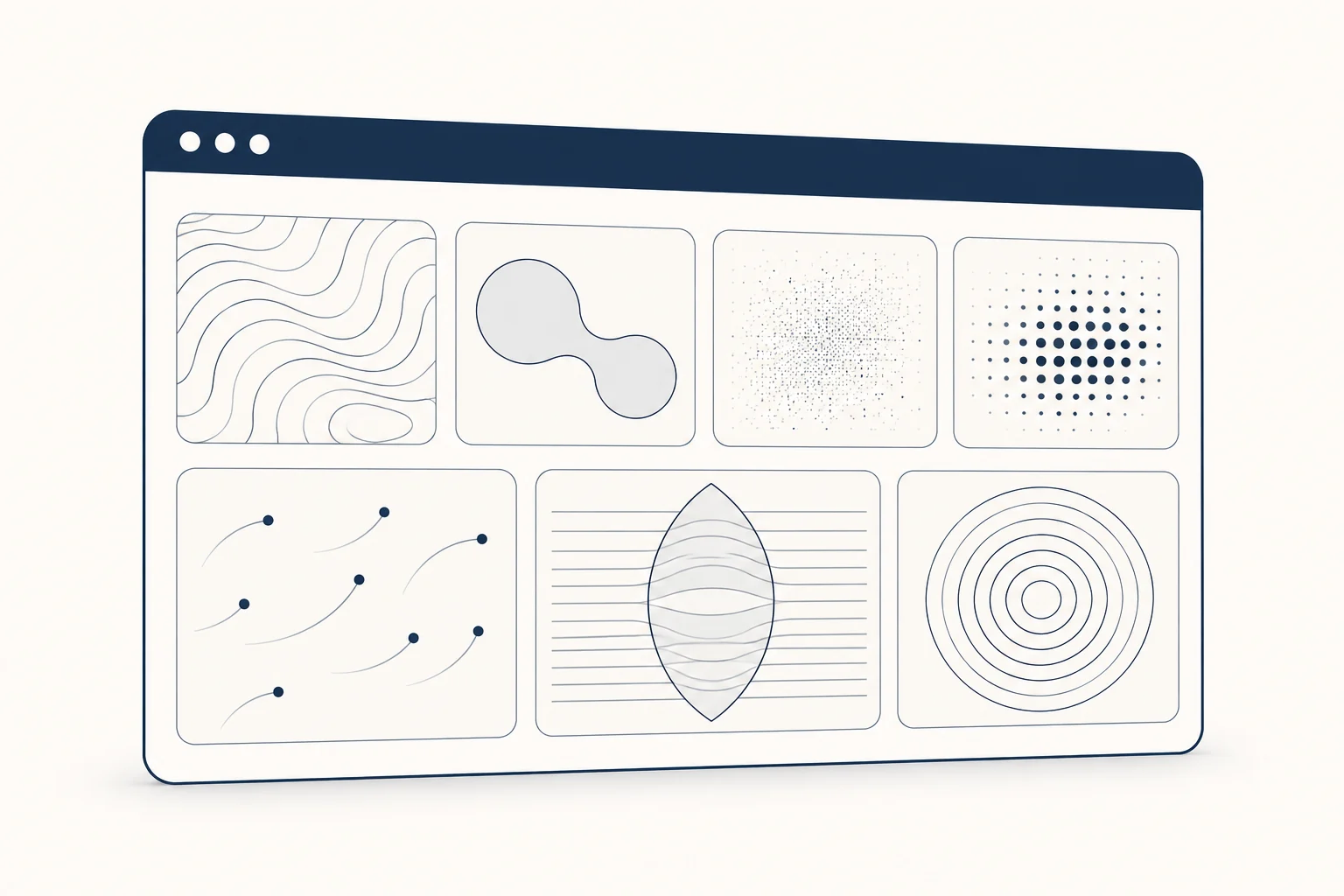
The best WebGL shader effects for websites are the ones that support the content instead of competing with it. In practice that means soft noise or mesh gradients for hero backgrounds, subtle grain to add texture, dithering or halftone for an editorial or retro look, and particles, liquid shapes, glass refraction and ripples for interactive moments. Each type has a different cost. Some run a full-screen calculation on every frame, which drains laptop and phone batteries. All of them need a still version for people who set their system to reduce motion and for devices that cannot run WebGL. This guide covers the seven effect families you will meet, what each is good for, what it costs, and where to get one: write GLSL yourself, use a library, adapt a Shadertoy (mind its licence) or tune one in a visual editor.
If you are still deciding whether a shader is the right tool at all, compared with a CSS gradient or a static texture, read our comparison of CSS, textures and shaders first. This article assumes you have decided on a shader and want to choose the effect well.
The seven shader effect families at a glance
Most shader effects on marketing sites are fragment shaders. They are small programs that run once for every pixel of the canvas, on every frame. Their cost grows with the number of pixels and with the work each pixel does: noise layers, loops and texture reads. Particle effects are different, because their cost grows with the number of particles and how much they overlap.
| Effect | Good for | Main cost driver | Still fallback |
|---|---|---|---|
| Noise and mesh gradients | Hero backgrounds, brand colour fields | Noise layers computed per pixel, full screen | One frame as an image, or a CSS gradient |
| Liquid and metaballs | Playful heroes, loaders, cursor followers | Distance to every blob per pixel; grows with blob count | One frame as an image |
| Grain | Texture, hiding gradient banding | Cheap per pixel, but animated full screen | A static grain image |
| Dithering and halftone | Editorial, retro, print-like brand looks | Cheap per pixel; fine patterns shimmer when scaled | One frame at native pixel size |
| Particles | Tech and data themes, cursor interaction | Particle count and overlap; JavaScript updates if positions live on the CPU | One frame as an image |
| Refraction and glass | Premium product heroes, frosted panels | Needs a texture of what is behind, plus blur samples | A static image of the glass |
| Ripple and displacement | Image hovers, water surfaces | Texture reads, plus extra buffers for a real ripple simulation | The undistorted image |
The cost column is a ranking guide, not a benchmark. We did not measure frame times for this article. Profile your own page on the slowest device you support.
Noise and mesh gradients
These are the most common shader backgrounds: colour fields that drift slowly, built from layered noise or from a grid of colour points blended together. They work because they read as atmosphere, not content, and they suit almost any brand palette.
The cost comes from the noise. Each extra layer of noise means more maths for every pixel, and a full-screen hero on a high-density display has millions of pixels. Slow movement is enough here. A gradient that shifts over 20 seconds looks calmer and is no more expensive per frame than a fast one, but it gives you room to lower the frame rate or pause it without anyone noticing.
The still fallback is easy: export one frame as an image, or approximate it with a CSS gradient.
Liquid shapes and metaballs
Metaballs are blobs that merge when they get close, like drops of liquid. The shader works out, for every pixel, how close it is to each blob, so the cost grows with the number of blobs. They suit playful brands, loading states and effects that follow the cursor.
Keep the blob count low and avoid placing body text over the moving edge, where contrast changes constantly.
Grain
Grain is noise laid over colour or an image. It adds a tactile, printed quality and hides the banding that smooth gradients sometimes show. Per pixel it is one of the cheapest effects, but it is usually full screen and often animated for no reason. A static grain texture looks almost identical and costs nothing per frame.
Strong grain also lowers text contrast, so keep it behind empty areas or turn its strength down under text.
Dithering and halftone
Dithering reduces colour to a pattern of dots or pixels; halftone uses dots of varying size, like print. Both give a strong editorial or retro identity and are cheap per pixel.
Their weak point is scaling. MDN's WebGL best practices warn that sizing a canvas from a device pixel ratio that is not a whole number, which is common with Windows display scaling and browser zoom, can cause moiré through rounding. MDN recommends measuring the canvas in real device pixels with devicePixelContentBoxSize from ResizeObserver. Fine dot and pixel patterns are where that shows first, so size these canvases carefully and avoid moving the pattern at speed.
Particles
Particles are many small points moving through space, often reacting to the cursor. They suit technology and data products. Their cost depends on how many particles you draw and how much they overlap, and on whether their positions are updated in JavaScript or on the GPU. Thousands of particles updated in JavaScript every frame is a common reason a page feels slow.
If you need full 3D scenes rather than a background effect, look at a 3D engine instead. Our three.js and WebGL experiences collection shows 24 complete designs made by the HorizonX team, most of them Premium.
Refraction and glass
Glass and refraction effects bend whatever sits behind them. To do that the shader needs a picture of the background, which means rendering the scene to a texture first or sampling a fixed image. A frosted look also needs blur, which reads many samples per pixel. That makes glass one of the more expensive families, especially at full screen.
Glass panels behind text also carry a readability risk, because the background shows through and moves. Test real copy over the busiest part of the effect.
Ripple and displacement
Displacement distorts an image or surface, either over time or around the cursor. A simple version shifts texture coordinates with a wave and is cheap. A true ripple simulation keeps the water state in extra buffers that are updated every frame, which costs more memory and GPU time. These effects suit image hovers, water surfaces and transitions.
Because cursor-driven ripples are motion triggered by interaction, they fall under WCAG 2.3.3 Animation from Interactions. That success criterion is Level AAA, but it is a good reason to switch the effect off when the user asks for reduced motion.
Performance and accessibility costs
Whatever the effect, the same five decisions control most of its cost:
- Resolution. Pixel count is the biggest lever for fragment shaders. Capping the device pixel ratio for the canvas cuts the work sharply on high-density screens. Paper Shaders takes a different approach: in its 0.0.82 source, which we read on 2026-11-09, it renders at a pixel ratio of at least 2 but caps the total at 1920 x 1080 x 4 pixels.
- When it runs. Stop the animation loop when the canvas is off screen (Intersection Observer) and when the tab is hidden (Page Visibility API). A background that keeps running below the fold uses the GPU for nothing.
- Power. The
powerPreference: "low-power"option ofgetContexttells the browser to prioritise power saving over rendering performance.failIfMajorPerformanceCaveatstops the context from being created when system performance is low or no hardware GPU is available, so you can show the fallback instead. - Precision. MDN's best practices note that in WebGL 1,
highpfloats are optional in fragment shaders, so requiring them can stop your effect on some older phones. Falling back tomediumpcan cause visible artefacts on mobile instead. Test on a real phone either way. - Context loss. The browser can lose a canvas's WebGL drawing buffer while the page is open. Listen for
webglcontextlostand stop drawing until it is restored.
Accessibility has three firm requirements:
- Reduced motion. Respect
prefers-reduced-motionby showing a still frame. - Pause control. WCAG 2.2.2 Pause, Stop, Hide (Level A) asks for a way to pause motion that starts automatically, lasts more than five seconds and runs alongside other content, unless the motion is essential. A looping background usually qualifies, so add a pause button or stop the motion within five seconds.
- No flashing. WCAG 2.3.1 asks that nothing flash more than three times in any one second, unless the flashes stay below the general and red flash thresholds. Fast strobing noise or glitch effects can break it.
A plain JavaScript lifecycle you can adapt
This sketch wires those rules around any fragment shader on a plain HTML page. It assumes a canvas with the id hero-shader, sitting over a container whose CSS background is the still image. drawFrame stands for your own shader's draw call. Shader compilation and buffer setup are left out. We checked the syntax with node --check on 2026-11-09 (it parses; it was not run in a browser). The 1.5 pixel ratio cap is a starting point to tune, not a measured value; for dither or halftone patterns, use a whole-number ratio instead.
const canvas = document.querySelector('#hero-shader');
const gl = canvas.getContext('webgl', {
  powerPreference: 'low-power',
  failIfMajorPerformanceCaveat: true,
});
const reduceMotion = window.matchMedia('(prefers-reduced-motion: reduce)');

if (!gl) {
  canvas.hidden = true; // the still image on the container stays visible
} else {
  let visible = true;
  let lost = false;
  let frameId = 0;

  function resize() {
    const dpr = Math.min(window.devicePixelRatio || 1, 1.5);
    canvas.width = Math.round(canvas.clientWidth * dpr);
    canvas.height = Math.round(canvas.clientHeight * dpr);
    gl.viewport(0, 0, canvas.width, canvas.height);
  }

  function loop(time) {
    drawFrame(gl, time);
    frameId = requestAnimationFrame(loop);
  }

  function update() {
    cancelAnimationFrame(frameId);
    frameId = 0;
    if (lost) return;
    if (reduceMotion.matches) {
      drawFrame(gl, 0); // one still frame, no loop
      return;
    }
    if (visible && !document.hidden) frameId = requestAnimationFrame(loop);
  }

  new IntersectionObserver(([entry]) => {
    visible = entry.isIntersecting;
    update();
  }).observe(canvas);
  new ResizeObserver(() => {
    resize();
    update();
  }).observe(canvas);
  document.addEventListener('visibilitychange', update);
  reduceMotion.addEventListener('change', update);
  canvas.addEventListener('webglcontextlost', (event) => {
    event.preventDefault();
    lost = true;
    update();
  });
  canvas.addEventListener('webglcontextrestored', () => {
    lost = false; // recompile shaders and recreate buffers here first
    update();
  });
}
In React the same rules apply, but the component that mounts the canvas must own the cleanup. Our guide to a React WebGL background with a static fallback covers how to plan that.
Ways to get a shader effect
Write GLSL yourself. The Book of Shaders is the standard free introduction to fragment shaders, noise and patterns. Writing your own gives full control and the smallest code, but tuning colours and motion by editing numbers is slow.
Use a library.
- Paper Shaders is Apache 2.0 and ships ready-made effects for React and plain JavaScript, including MeshGradient, GrainGradient, Dithering, Metaballs, LiquidMetal, Water, FlutedGlass and HalftoneDots. Its npm packages were at 0.0.82 on 2026-11-09, and its README asks you to pin the version because breaking changes can land in 0.0.x releases. Its source pauses rendering when the canvas is off screen or the tab is hidden. We found no reduced-motion check in the source, so add your own.
- three.js (MIT) is a full 3D engine. Pick it when the effect lives in a 3D scene.
- OGL describes itself as a minimal WebGL library for people who want few layers of abstraction. It is published on npm under the Unlicense.
- React Three Fiber (MIT) lets you write three.js scenes as React components.
Adapt a Shadertoy. Shadertoy hosts a very large public collection of shaders and is a good place to see what is possible. Two cautions apply. First, its terms page puts shaders under Creative Commons Attribution-NonCommercial-ShareAlike 3.0 unless the author states another licence in the code. That rules out commercial use without the author's permission. Second, Shadertoy code uses its own inputs (mainImage, iTime, iResolution), so it needs a small wrapper to run on your page.
Browse curated lists. awesome-web-shaders collects GLSL, WGSL, WebGL and WebGPU resources. It is a new list, so check each linked project's licence yourself.
Tune one in a visual editor. Editors let you change colours, speed and scale with live controls and then export code. Shaders offers open-source WebGPU components, a free design editor with code export, and a Pro tier at $10 a month (checked 2026-11-09). The HorizonX shader editor is described in the next step. If you are weighing a code library against an editor, our Paper Shaders vs visual editors comparison suggests testing both on the same brief.
FAQ
Do WebGL backgrounds hurt page speed? They add JavaScript to download and GPU work on every frame. The biggest risks are a loop that never stops and a canvas drawn at full device resolution. Pause it when off screen and cap the resolution.
Can I use Shadertoy code on a client website? Not by default. Unless the author states another licence, Shadertoy shaders are non-commercial. Ask the author or pick a shader with a permissive licence.
What should show when WebGL is not available? A still image of the effect, set as the CSS background behind the canvas, so the layout looks finished with or without WebGL.
Which effect is cheapest? Static grain and dithering are cheap per pixel. Any effect becomes cheap once it stops animating, which is why a still frame is the right reduced-motion fallback.
Next step
To try these effect families without writing GLSL, open the HorizonX shader library. On 2026-11-09 it listed 33 shaders made by HorizonX, grouped as particles, gradients, lines, ripples and waves. Each one opens in its own editor with live controls for things like speed, noise scale, grain and colours, and you can open and tune them with no sign-up. Exporting is part of a HorizonX membership. Exports come as a self-contained HTML file, a Svelte component or React JSX with no HorizonX runtime. According to HorizonX's shader page, each shader holds a still frame when the visitor prefers reduced motion and shows a short message where WebGL is missing. Add your own still image behind it if you want the layout to look finished without WebGL.